 EmailDJ
KNOW WHO HAS THE NEXT MOVE
Track the reply you need. Keep the context with it.
An email follow-up tracker keeps outstanding requests visible after you send them. EmailDJ uses a Waiting view to help you see who owes an answer or deliverable, review what has arrived, and prepare a follow-up around what is still missing.
EmailDJ is an AI email workspace for independent consultants. It brings tasks, outstanding replies, people and next actions together, with the original correspondence available for review.
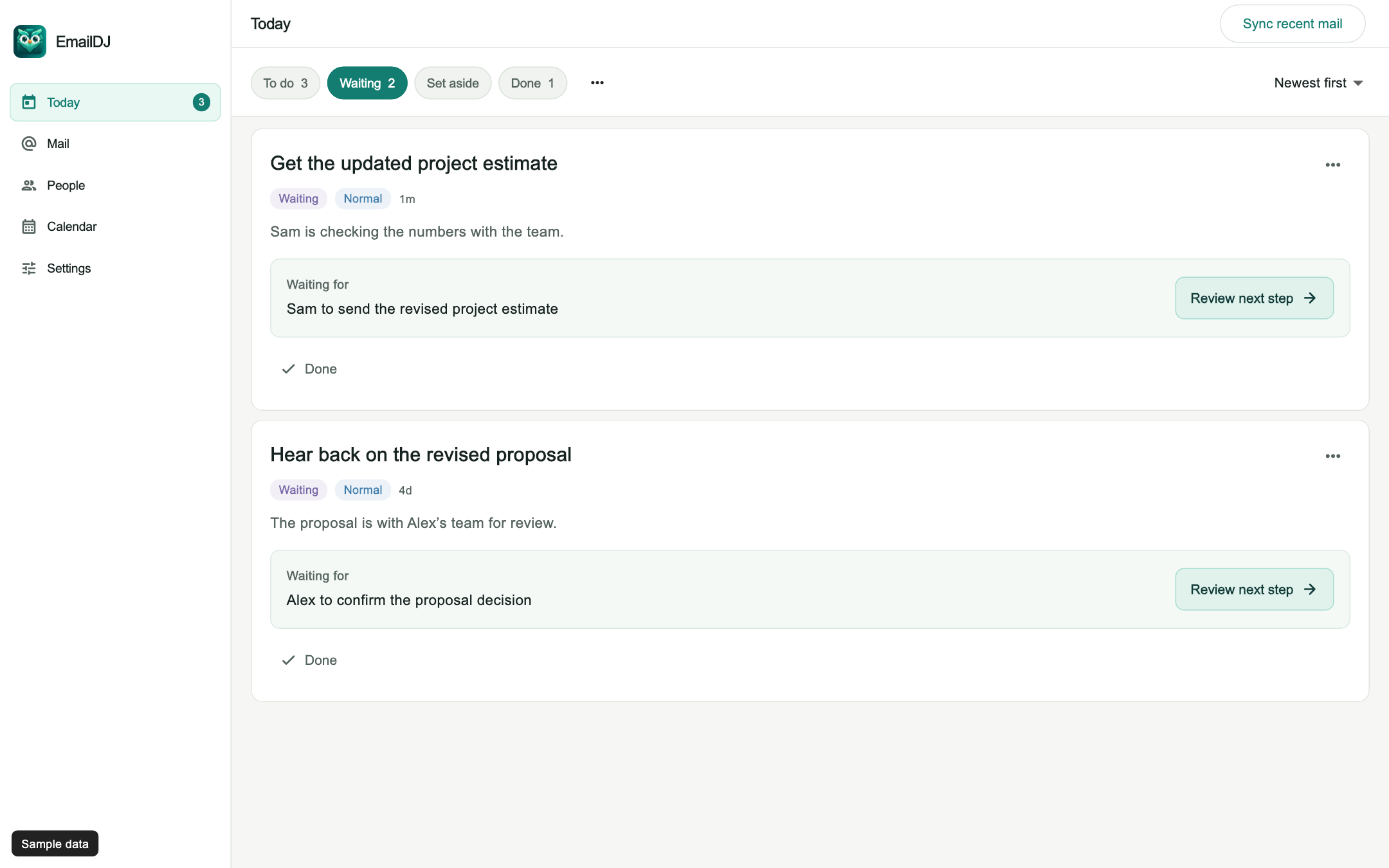
01 / follow-up tracking
Track the outstanding request, not just the sent date
A sent message is easy to forget because the work disappears from the top of the inbox. Yet the request inside it can still be holding up an estimate, launch or client decision. A follow-up list is useful when it tells you what is missing, not only that you sent an email last Tuesday.
EmailDJ reads sent requests as part of the topic's correspondence. Waiting represents an external dependency: another person needs to provide an answer, approval or delivery. Your own promise to send a document is different and belongs with your work. Keeping that distinction clear helps you decide whether to follow up with someone or finish your own next step first.
02 / follow-up tracking
Make Waiting part of a simple review routine
- Look at the request. Confirm the person and the result you actually asked for. A copied address is not automatically an approver.
- Read the latest response. Check whether it provides the requested result, a progress update or only an acknowledgement.
- Follow up on the gap. Ask for the missing answer in the existing conversation, with only the context the recipient needs.
You can move work to Waiting yourself. That local decision does not depend on a successful AI request; EmailDJ can interpret the dependency afterward. You do not need to type a full reminder specification before you can get the task out of your active work list.
03 / follow-up tracking
A reply does not always finish the request
“Thanks, looking at this” confirms receipt. It does not approve the budget. “The dates work” answers a scheduling question, but might leave an attachment request open. When several people must provide different inputs, one person's reply should not erase everyone else's obligation.
EmailDJ is designed to retain outstanding dependencies as evidence changes. You should still check the source before treating the case as finished, especially when the answer is conditional or the recipient redirects you. This is also why opening an email is a different signal from completing the request inside it. Follow-up tracking here concerns the work still owed, rather than a promise of read receipts or click monitoring.
04 / follow-up tracking
Follow up with a useful question
Before writing, identify the smallest answer that would let the work move. Is it a yes or no, a named decision-maker, a file, or a realistic review date? A message that asks for one clear result is easier to act on than a vague check-in that makes the client reread the entire thread.
EmailDJ can help prepare an editable draft from the correspondence. Review the recipient, quoted history, outstanding ask and tone before sending. It does not need to send a sequence on your behalf to make the next step easier. For wording you can adapt immediately, see the unanswered-email examples and the proposal follow-up page.
CHOOSE WHAT FITS
Which follow-up signal do you need?
| Method | Helps you notice | Still needs a decision |
|---|---|---|
| Calendar reminder | A date you chose | Whether the answer has arrived |
| Open tracking | A reported email-open event | Whether the recipient answered the request |
| EmailDJ Waiting | The outstanding person and requested result | Whether the evidence resolves the dependency |
AN ILLUSTRATIVE EXAMPLE
Two requested files, one partial reply
Imagine you ask Maya for the approved launch brief and Sam for the final cost sheet. Maya sends the brief, while Sam replies that finance is checking the totals. The topic has moved forward, but the cost sheet is still missing.
A useful next message goes to Sam about that specific sheet. It does not chase Maya for something already delivered or claim that finance approved the cost. If Sam gives a new review date, check it against the actual wording before relying on it.
Open the sample Waiting screen to see how pending client work is presented. This scenario is illustrative, not a customer result or response-time benchmark.
BEFORE YOU START
Common questions
Does EmailDJ automatically send follow-ups?
You review and send messages yourself. AI can help prepare a draft, but a Waiting case is not permission to send an automated email sequence.
Is Waiting the same as snoozing something?
No. Waiting means another person owes something. Set aside is a separate choice for work you intentionally pause and can resume later.
Can I use it with my email provider?
Check the mailbox setup guide for current Microsoft, Gmail, Google Workspace and iCloud connection requirements. Organization policies can affect availability.
LESS INBOX. MORE FOLLOW-THROUGH.
Try it with the work already in your inbox.
Explore the sample screens, check your mailbox setup, then choose the plan that fits. AI included and bring-your-own-key plans are available; AI usage and billing terms are explained with the plans.