 EmailDJ
MAKE THE PENDING DECISION VISIBLE
Know which client decision is still holding up the work.
Client approval tracking by email means keeping the requested decision, relevant version, approver and response together. EmailDJ helps you follow pending decisions in your correspondence and check the evidence before treating a request as approved or complete.
EmailDJ is an AI email workspace for independent consultants. It brings tasks, outstanding replies, people and next actions together, with the original correspondence available for review.
01 / client approvals
Make the approval request specific enough to answer
“Any thoughts?” can start a conversation, but it leaves the decision unclear. Before requesting approval, name the deliverable, identify the version and explain what response will let the work move. If a decision is needed by a date, state that date and the actual consequence of a delay without inventing urgency.
For example, ask whether the client approves the launch copy dated November 3 for the planned release. If they need changes, ask them to identify the sections. This gives both sides a concrete result to track. EmailDJ can help you keep that request and the later replies in view, with the original correspondence available for inspection.
02 / client approvals
Keep acknowledgements separate from decisions
“Received, thank you” confirms the message arrived. “The wording looks fine, but finance needs to approve the cost” resolves only part of the request. “Please check with Maya” redirects the question. These replies should lead to different next steps.
- Read the authored reply. Check what the person actually said, rather than treating quoted text as a new approval.
- Identify the result. Was there an approval, a change request, an acknowledgement or a redirect?
- Retain the missing decision. Keep the unresolved part visible until the required person provides it or you deliberately change the request.
Waiting is useful when someone else owes that decision. If you accepted a revision request, the revision itself is your work. A single conversation can contain both an outstanding client dependency and an action you need to take.
03 / client approvals
Check every required approver and every material condition
When a request needs answers from several people, decide what completion actually requires. Does the client need both design and finance approval, or is one named person authorized to decide? Do not infer that any one reply is enough merely because several addresses appeared in To or CC.
Likewise, approval can be limited to a version or condition. A client who approves the wording has not necessarily accepted a later price change. Keep the original scope in the record and ask a clear new question when the requested decision changes. EmailDJ's topic context can help you inspect the sequence, while your review establishes what the evidence supports.
04 / client approvals
Use the right system for the kind of sign-off
EmailDJ is useful when client decisions already happen in email and you need to see what remains outstanding. You can review the task, inspect the source and prepare a focused follow-up. The aim is to make the next move understandable without searching several old threads.
If your process requires document annotation, a formal version-review portal, electronic signatures or a prescribed approval record, choose tools that provide those requirements. Do not treat an AI summary as a substitute for the required sign-off. For ordinary client coordination, a clear email request and its actual reply can still make day-to-day work much easier to follow.
CHOOSE WHAT FITS
A reply, an email decision and formal sign-off
| Signal or method | What it establishes | What to check next |
|---|---|---|
| Acknowledgement | The person received or noticed the request | The actual decision is still outstanding |
| Explicit email approval | The decision stated in that message | Version, scope, conditions and decision authority |
| EmailDJ tracking | A view of the decision and source correspondence | Whether the email evidence satisfies your workflow |
| Formal review/signature process | The record provided by that system | Your required approval and recordkeeping process |
AN ILLUSTRATIVE EXAMPLE
The copy is approved; the launch is not
In a fictional launch conversation, Maya approves the final copy. Alex says the launch date depends on a budget check. A blanket “approved” task summary would hide the decision that still matters.
Keep the copy approval with its source, retain the budget dependency and follow up with the person responsible for it. An appropriate question is: “Maya has confirmed the copy. Can you confirm the budget decision for this launch, or tell me when that review will finish?” Review the wording against the actual messages before sending.
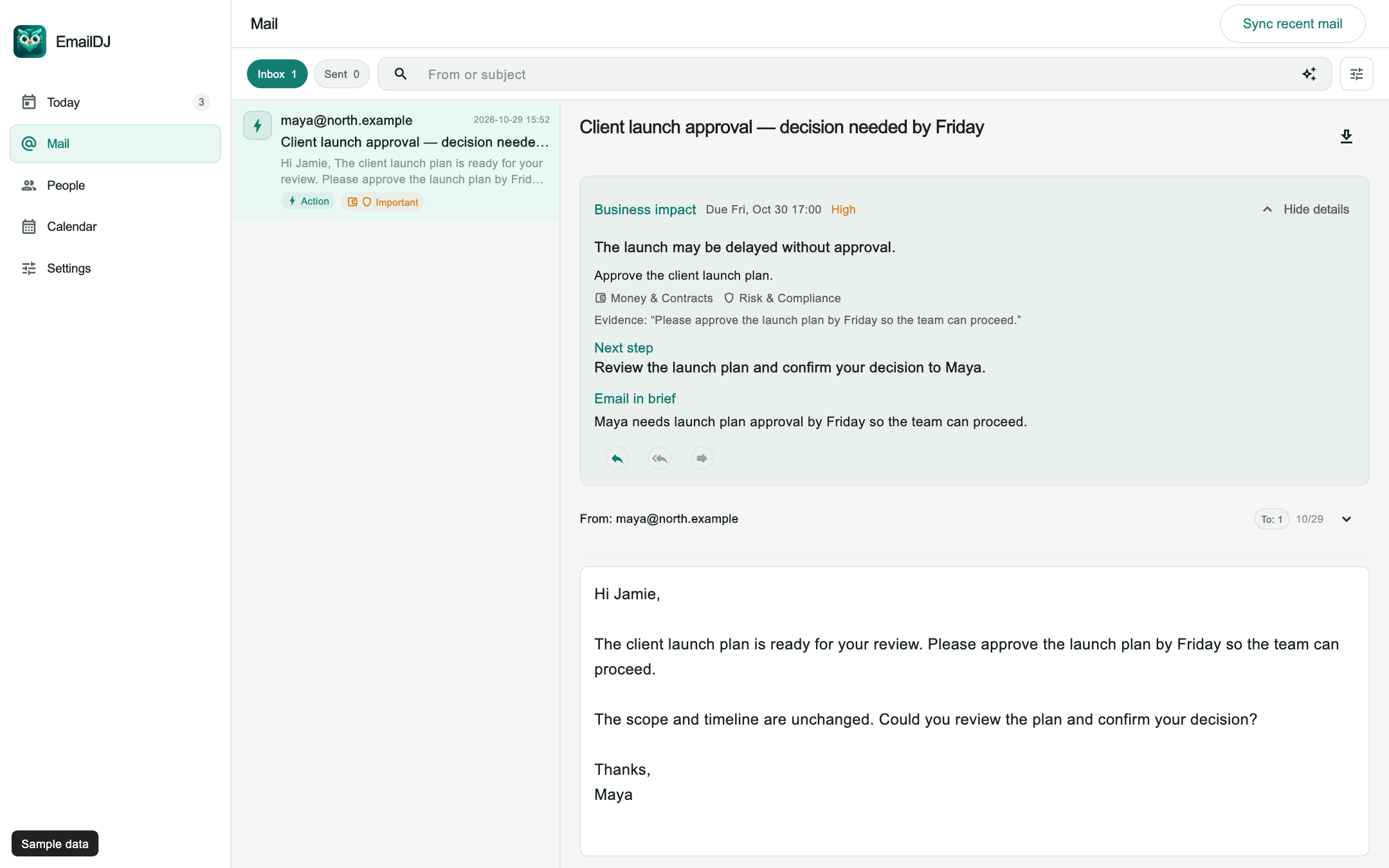
Explore the Business impact sample screen. The example illustrates email coordination; it is not a formal sign-off service or a reported customer outcome.
BEFORE YOU START
Common questions
Does an acknowledgement count as approval?
Only if the actual wording provides the decision your process requires. A thank-you or promise to review usually leaves the approval request outstanding.
Does EmailDJ collect electronic signatures?
This workflow tracks decisions in correspondence. Use a suitable signature or formal approval system when your process requires one.
What if only one of two people replies?
Keep the remaining dependency visible when both results are required. Confirm who can decide and whether the first response resolves only part of the request.
LESS INBOX. MORE FOLLOW-THROUGH.
Try it with the work already in your inbox.
Explore the sample screens, check your mailbox setup, then choose the plan that fits. AI included and bring-your-own-key plans are available; AI usage and billing terms are explained with the plans.