 EmailDJ
A DRAFT YOU CAN CHECK
Reply with the context in view and the final say in your hands.
An AI email reply assistant helps prepare a response from the message and its conversation context. EmailDJ creates editable drafts around the next action, while you review the recipients, facts, commitments and quoted history before choosing to send.
EmailDJ is an AI email workspace for independent consultants. It brings tasks, outstanding replies, people and next actions together, with the original correspondence available for review.
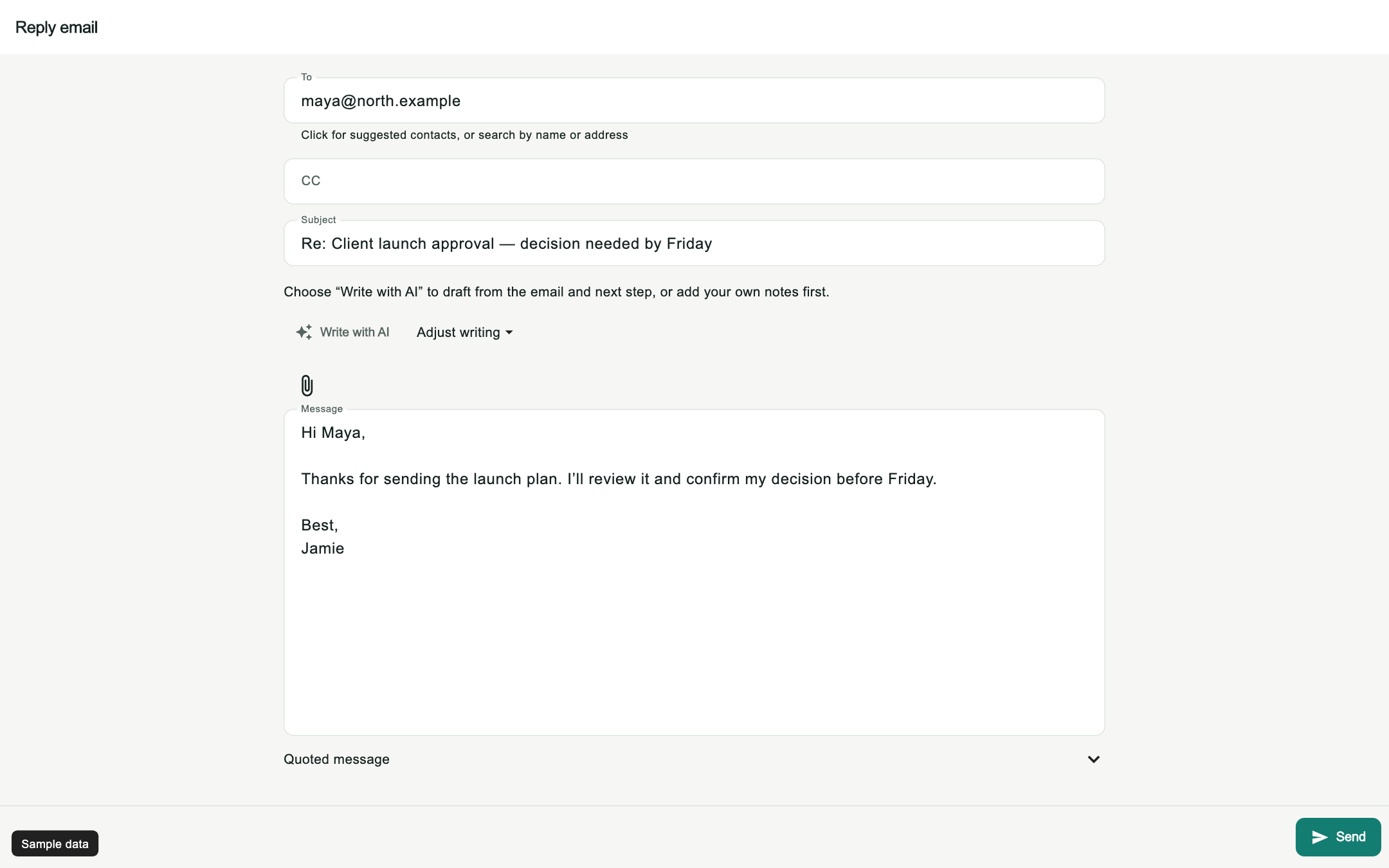
01 / reviewed AI replies
Decide what the response needs to accomplish
Writing polished sentences is only part of a useful reply. First identify whether the message needs an answer, a decision, a delivery, a redirect or a clarification. A fluent response can still be wrong if it accepts work you never agreed to do or asks again for something already supplied.
EmailDJ uses task and correspondence context to help prepare the next move. The original conversation stays available so you can inspect what supports the draft. Unknown recipients, dates and commitments need verification. Treat the draft as something you can review and change, rather than as proof that every fact or responsibility has already been settled.
02 / reviewed AI replies
Keep editing while preparation happens
Reply, Reply all, Forward and New email open an editable composer immediately. Identity, contacts, quoted content and optional AI work can load afterward. You can start typing, inspect the message and choose recipients without waiting for every background operation to finish.
Your edits and reviewed recipient choices take precedence over late background results. That matters in everyday use: you might begin a short response while a richer draft is being prepared, or remove a copied recipient who no longer needs the conversation. The preparation should support the decision you are making, not make you repeat it after another result arrives.
03 / reviewed AI replies
Use a consistent review before sending
- Recipients: verify To, CC and the sending identity. A person mentioned inside a quoted email is not automatically the next recipient.
- Facts: check dates, file references, amounts and the actual answer against the available evidence.
- Promises: remove deadlines, offers or commitments that you cannot support.
- Scope and tone: make the message fit the relationship and the decision you intend to make.
- Quoted content: confirm that the relevant history and any attachment you refer to are appropriate for this message.
You can edit the body directly or use a revision hint for further AI help. Keep the review focused on what the recipient will understand and what work the message creates for either side.
04 / reviewed AI replies
Send deliberately and keep the next action clear
You choose the send action. Clicking Send acknowledges the submission, while delivery success is shown only after the mail server accepts the message. If submission fails, the draft should remain available so you can correct the problem and try again without recreating your response.
After sending, look at what the message established. An answer may resolve a question. A request may leave you waiting for a client. A promise may create work for you. EmailDJ's post-send task analysis is separate from submission, so interpreting the next state does not need to hold up the actual sending step. For more on that distinction, see email commitments.
CHOOSE WHAT FITS
A template, an AI draft and a reviewed reply
| Approach | Useful starting point | Your review |
|---|---|---|
| Saved template | Repeated message structure | Replace details and check fit |
| Standalone generator | Wording from the context you paste | Provide missing history and verify output |
| EmailDJ draft | Task, correspondence and known contact context | Check facts, recipients and commitments, then send |
AN ILLUSTRATIVE EXAMPLE
A clear clarification without a new promise
Imagine a client asks whether a launch can move earlier. The thread shows that the final budget is still pending. A draft should help you identify the dependency, not invent a promise that the new launch date is confirmed.
Hi Maya,
I can review the earlier launch date once the budget decision is confirmed. Can you let me know when that review will finish? I will then check the delivery plan against the confirmed scope.
Best,
[Your name]
Use this fictional example only if those statements match the conversation and your intended commitment. Explore the sample reply editor to inspect an editable message with recipient and quote context.
BEFORE YOU START
Common questions
Can AI send a message without my review?
The workflow described here prepares editable drafts for you to review and send. A suggested next action or a Waiting status is not authorization for an automatic message.
Is the website demo a live AI reply generator?
No. It is a sample-screen walkthrough. It makes no mailbox, AI or SMTP calls, and its sample send control does not send a real email.
Do I need my own AI key?
EmailDJ offers AI included and bring-your-own-key plans. See current plans and AI usage details; provider usage and included allowances differ.
LESS INBOX. MORE FOLLOW-THROUGH.
Try it with the work already in your inbox.
Explore the sample screens, check your mailbox setup, then choose the plan that fits. AI included and bring-your-own-key plans are available; AI usage and billing terms are explained with the plans.