 EmailDJ
FOR INDEPENDENT CONSULTANTS
Several clients. One clear view of what needs you.
Email management for consultants means keeping each client's requests, your commitments and pending decisions clear across engagements. EmailDJ gives that work a shared view through Today, Mail, People and Calendar, while preserving the original conversations behind it.
EmailDJ is an AI email workspace for independent consultants. It brings tasks, outstanding replies, people and next actions together, with the original correspondence available for review.
01 / consultant workflows
Start the day with responsibility, not inbox order
Client email mixes several kinds of work: a question you need to answer, a document someone promised to send, a copied update and a decision that changes the scope. Reading newest first can hide the most important commitment under a pile of messages that arrived later.
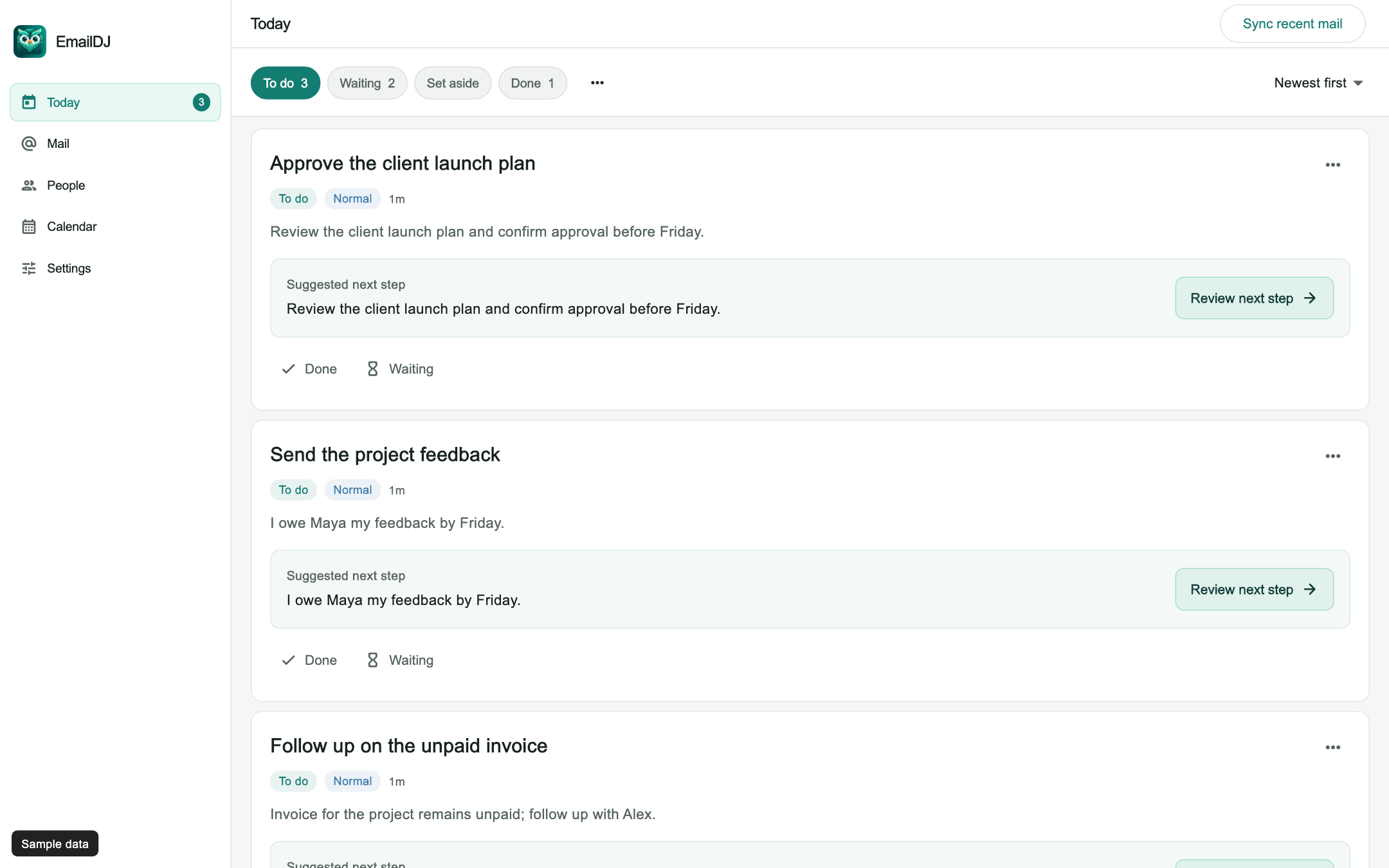
Begin with three questions: what do I owe, what am I waiting for, and what has changed? In EmailDJ, Today helps you review To do, Waiting and Done. Mail keeps the messages themselves available. You can look at a task, understand its current context, and return to the exact correspondence when a detail matters.
02 / consultant workflows
Use a practical three-part inbox routine
- Before client work: review your own commitments and any pending answer that blocks today's delivery. Check the source if a date or responsibility is unclear.
- Between work sessions: process new requests into the right state. Answer a clear question, prepare the work you accepted, or keep an external dependency in Waiting.
- Before finishing: check what you promised in sent mail. Put completed work in Done and deliberately set aside work that should be quiet.
The purpose is to reduce the number of open decisions in your head. It is not a requirement to empty the inbox or respond to every copied message. A readable update may still require no action, while a short reply you wrote may contain a real delivery promise.
03 / consultant workflows
Keep each client conversation grounded in its own history
When several clients discuss similar deliverables, it is easy to remember the right fact in the wrong context. One client approved a draft, another asked for changes, and a third has not selected a decision-maker. Reusing the same next step across all three can create unnecessary confusion.
Use People to find the contact, inspect communication history and check the relevant organization before replying. Use the source thread to confirm scope and decisions. EmailDJ's task and contact context helps you prepare for the next interaction without treating a name, job title or old helpful reply as proof that someone owns every future request.
04 / consultant workflows
Separate pending decisions from the promises you made
A sent proposal is usually waiting for the client's next move. A reply that says you will send a revised budget creates work for you. Both are important, but they should not compete as if they were the same task. Check which side has the next action before spending time on another follow-up.
For review meetings, Calendar can help you inspect dated mail-derived work. Its reporting flow can prepare an editable update from correspondence and calendar evidence. Check any report before sharing it, especially when a date changed or a client supplied only part of the answer. The email-based status report page explains that workflow in more detail.
CHOOSE WHAT FITS
Choose a workflow around your client work
| Approach | Useful for | What you maintain |
|---|---|---|
| Client folders | Finding correspondence by engagement | Which message still needs action |
| Separate task list | Planning work beyond email | Links and updates from later replies |
| EmailDJ | Work, waiting requests and people in correspondence | Reviewing responsibility, evidence and next actions |
AN ILLUSTRATIVE EXAMPLE
A morning across three engagements
A fictional consultant starts with three items: a launch plan to review for Maya, a proposal decision pending with Alex, and a cost sheet Sam promised to send. Only the review is currently the consultant's own delivery task.
Alex then requests a revised scope. That incoming message changes the next move: the consultant now has a concrete response to prepare. Sam confirms the cost sheet will arrive later; the dependency remains visible rather than becoming a completed deliverable. After each change, the source correspondence explains the current position.
This routine is useful even without an inbox-zero target. Explore the sample workspace and see the separate contact-context workflow.
BEFORE YOU START
Common questions
Is this for an individual consultant or a shared support team?
These pages focus on an individual consultant's email work. If you need shared support queues, ticket SLAs or team resource planning, assess those requirements separately.
Do clients need to join another portal?
The workflow described here uses your connected email correspondence. Clients continue to exchange email; the interactive website demo uses sample data only.
What should I check before connecting a client mailbox?
Read security and data handling and the connection guide. Confirm that your client's or organization's mailbox and AI-use policies allow the setup.
LESS INBOX. MORE FOLLOW-THROUGH.
Try it with the work already in your inbox.
Explore the sample screens, check your mailbox setup, then choose the plan that fits. AI included and bring-your-own-key plans are available; AI usage and billing terms are explained with the plans.